 InSnap
PNG or JPEG for Screenshots? We Measured 63 Real Ones

For interface screenshots, JPEG is often no smaller than PNG. We compared PNG, JPEG and WebP on 63 real screenshots: file sizes, text artifacts and what really shrinks a file.
For a screenshot of an app window, JPEG is often not smaller than PNG. In our test of 63 real interface screenshots, JPEG at quality 85 came out at 96% of the PNG size on the median, and in 40% of the images it was larger. To get a clearly smaller file you have to drop to quality 70 or lower, and that puts halos around the text.
The bigger saving is somewhere else: scaling a Retina screenshot down to 1x. That is the setting to reach for first.
How we measured
We rendered 63 screenshots of InSnap's own interface at Retina (2x) size, 1840 × 1320 pixels each: 20 settings pages, 18 history views, 7 image-editor screens, 13 guide-editor screens and 5 video-editor screens. The median PNG, as saved, was about 195 KB.
Each one was re-encoded as PNG with optimization, JPEG at quality 95, 85, 70 and 50, and WebP both lossless and lossy. For each result we recorded the file size relative to the PNG, and the share of pixels that changed visibly, meaning any color channel off by more than 8 out of 255.
This is flat interface content, the typical "screenshot of an app", with no photographs. A full Retina display holds roughly three times as many pixels as these windows, so absolute sizes will be larger on yours.
The results
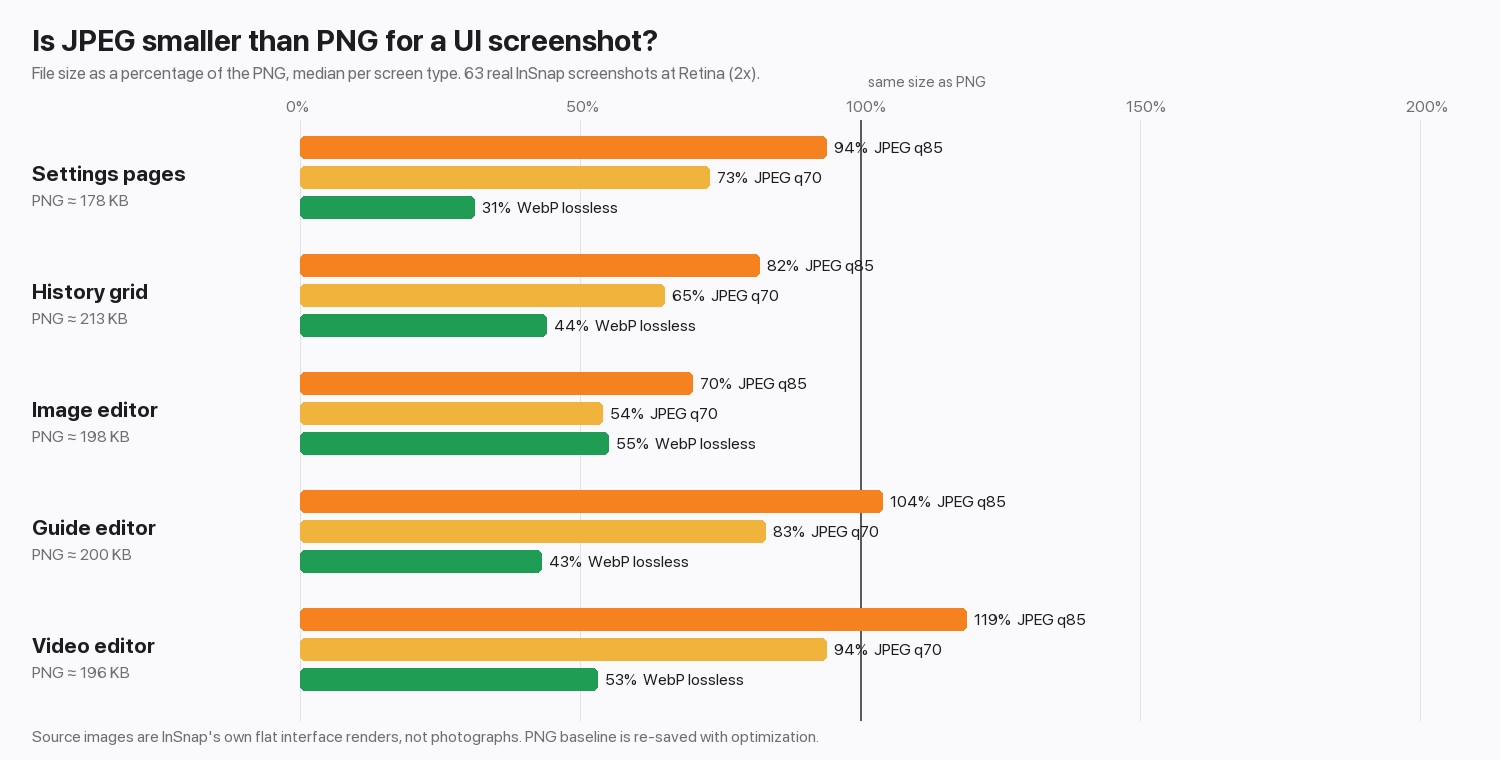
| Encoding | Size vs PNG (range across the five screen types) | Pixels visibly changed |
|---|---|---|
| PNG | 100% | 0% |
| JPEG, quality 95 | 107% to 181% | 0.5% to 1.2% |
| JPEG, quality 85 | 70% to 119% | 1.4% to 1.8% |
| JPEG, quality 70 | 54% to 94% | 2.5% to 3.0% |
| JPEG, quality 50 | 45% to 78% | 3.5% to 4.1% |
| WebP, lossless | 31% to 55% | 0% |
| WebP, quality 90 | 30% to 44% | 0.5% to 1.3% |
Three things stand out.
- High-quality JPEG can cost more than PNG. Flat colors and sharp edges are what PNG compresses best and what JPEG handles worst. Full-chroma JPEG (4:4:4), which keeps colored text cleaner, was bigger still: 93% to 155% of the PNG at quality 85.
- Lossless WebP was the smallest lossless option, at 31% to 55% of the PNG. InSnap saves PNG or JPEG, so this shows what a different encoder could do rather than a setting you can pick. Check that the place you upload to accepts WebP first.
- Every lossy step changes the text. The price of a smaller JPEG is paid on exactly the pixels you care about.
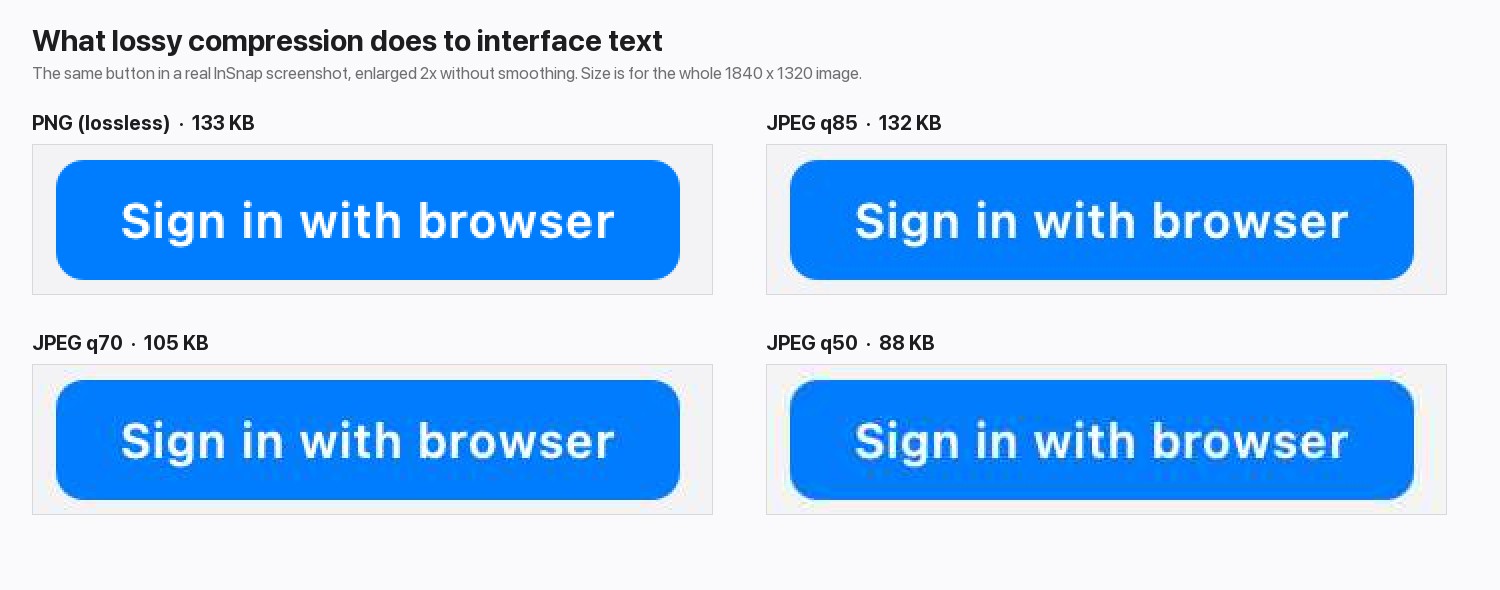
At quality 85 the button text is almost identical and the file is the same size as the PNG, so there is nothing to gain. At 70 and 50 the file shrinks, and a faint halo appears around the white letters.
What actually makes a screenshot smaller
Scaling beats re-encoding. A Retina screenshot has four times the pixels of a 1x one, and in InSnap that is a single option.
| Change (median of the 63) | Size vs the 2x PNG |
|---|---|
| Scale to 1x, keep PNG | 67% |
| Scale to 1x, then JPEG quality 85 | 37% |
| JPEG quality 85 at 2x | 96% |
Flat interface images compress so well that cutting the pixel count by three quarters shrinks a PNG by only a third, but the combination of 1x and JPEG is the smallest option that still keeps text legible.
In InSnap, open Settings › Save, switch on Scale Retina to 1x, and choose the image format there. Details are in PNG, JPEG and clipboard formats, and the full checklist for oversized files is in screenshot too large to upload.
Which format to use
| Situation | Use |
|---|---|
| Documentation, bug reports, slides, anything with text | PNG |
| Too big for an email or form | Scale Retina to 1x first, then JPEG at quality 85 or higher if the destination needs it |
| A photo or a video frame | JPEG; we did not measure photographs, and JPEG is designed for them |
| You will edit or crop it again | PNG; JPEG loses a little more each time you re-save it |
FAQ
Is JPEG smaller than PNG for screenshots?
Not reliably. For flat interface screenshots, JPEG at quality 85 was about the same size as PNG in our test, and larger in 40% of the images. It gets smaller at lower qualities, with visible artifacts around text.
Why is my JPEG screenshot bigger than the PNG?
Screenshots are mostly flat colors and sharp edges. PNG stores those very efficiently, while JPEG spends bits on the edges to avoid blur. Photographs behave the other way round.
Does scaling a Retina screenshot to 1x hurt quality?
It halves the width and height, so text is rendered with a quarter of the pixels. That is fine for documents, chat and email. Keep full resolution when the image will be viewed on a Retina screen or cropped again.
Is WebP better than PNG for screenshots?
In our test lossless WebP was 31% to 55% of the PNG size with no change to the pixels. InSnap saves PNG or JPEG, and some uploads do not accept WebP, so check the destination before converting.
More from the blog

Screenshot Too Large to Upload? Why It Happens and How to Shrink It
A full-screen Retina PNG can run to several megabytes. Here is where the size comes from, and the scale, format and crop settings that bring it down without blurring text.
October 30, 2026
PNG, JPEG and Clipboard Formats: Screenshot Output Settings
Save as PNG or JPEG, scale Retina captures to 1x, add a border, and choose whether Copy puts an image or a file on the clipboard. What each setting changes.
October 25, 2026
Where Are Screenshots Saved on Mac and Windows?
On a Mac, screenshots land on the Desktop by default; on Windows they go to Pictures › Screenshots. How to find them, change the folder, and stay organized.
October 24, 2026
InSnap Screenshot History: Filters, Search and Shortcuts
A reference to the screenshot history: every sidebar filter, the search syntax, layouts, batch actions and the shortcuts that get you around it faster.
October 25, 2026