 InSnap
Is a Blurred Screenshot Safe? We Tried to Read Ours Back

We blurred and pixelated a real ID with InSnap, then tried to read it back with OCR and deconvolution. Which strengths held, which leaked, and what to use instead.
Light blur is not safe; strong blur and mosaic held up in our test, but only against the attack we ran. We blurred and pixelated a real string with InSnap's own Mosaic and Blur code, then tried to read it back. At low blur strengths the text came back. At the defaults it did not.
That does not make blur a good place to hide a secret. It tells you where the cliff is for one sample, and a determined attacker has more tools than we used. For anything that must not leak, cover it or crop it.
How we tested
We used a string that exists in InSnap itself: the Device ID in Settings (A1B2-C3D4-E5F6-7890), rendered as a Retina (2x) screenshot at normal interface text size.
- Run InSnap's own Mosaic at strengths 5, 8, 10, 15 and 25, and Blur at 1, 2, 3, 5, 8 and 12. The defaults are Mosaic 15 and Blur 3.
- Crop the redacted line, the way a screenshot would be shared.
- Read it with InSnap's OCR. This is the "as shared" result.
- For blur, try to undo it. We used Wiener deconvolution, a standard image-restoration method, and gave the attacker the exact blur size. We repeated it after saving the blurred crop as a JPEG at quality 85.
Mosaic has no equivalent undo step. Its blocks keep only an average per block, so the only route is guessing candidate text, which we did not try.
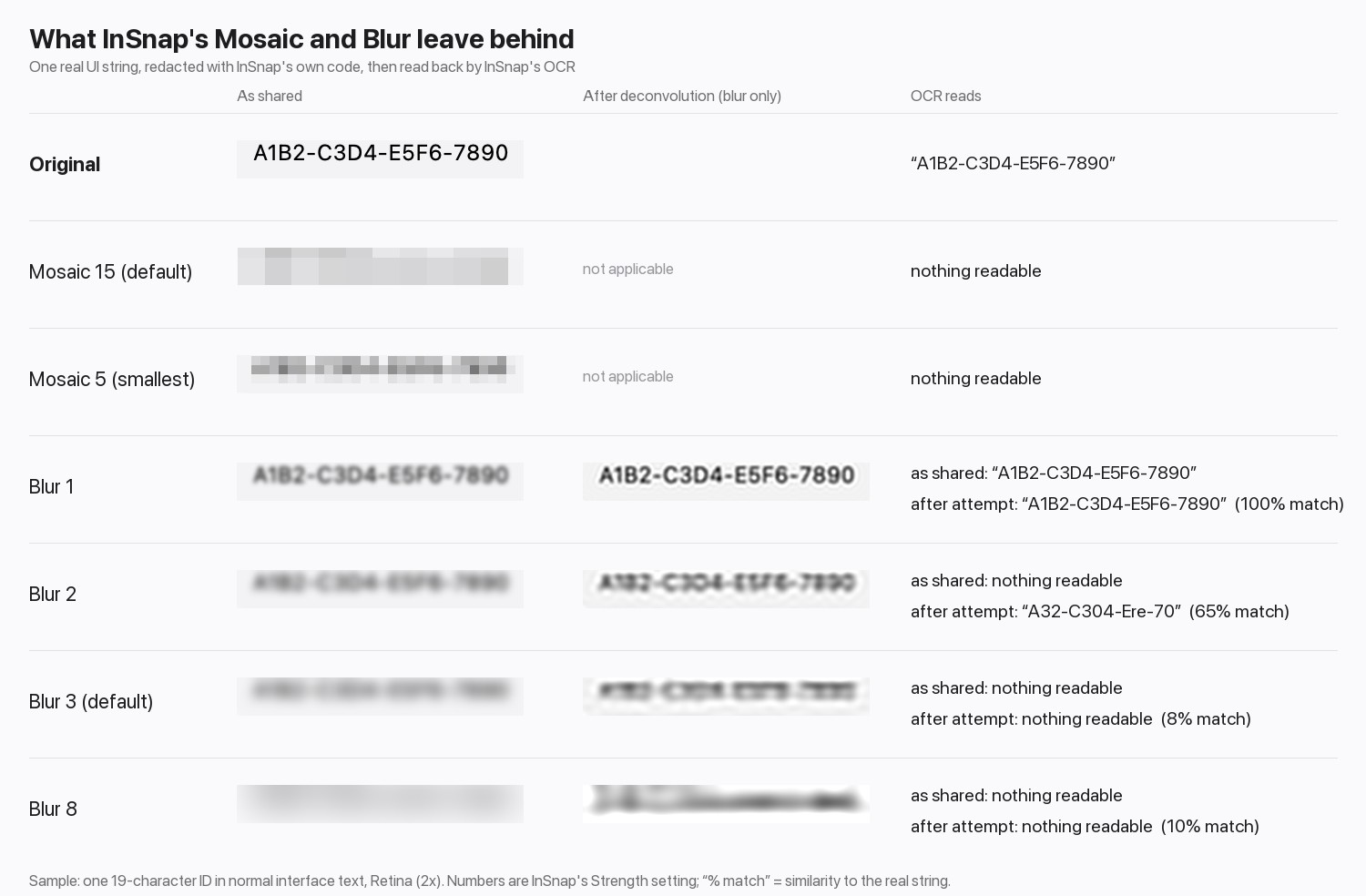
What came back
| Treatment | Strength | Read as shared | After the restoration attempt |
|---|---|---|---|
| Mosaic | 5 to 25 (default 15) | Nothing readable | Not applicable |
| Blur | 1 | Full string | Full string |
| Blur | 2 | Nothing readable | 65% of the string, and the restored image is largely legible by eye |
| Blur | 3 (default) | Nothing readable | Nothing readable |
| Blur | 5, 8, 12 | Nothing readable | Nothing readable |
JPEG at quality 85 changed little: blur 1 was still fully recovered, blur 2 gave a similar partial result, blur 3 and above did not.
Two things stand out. Blur 1 is not redaction at all; the text is readable as shared. And blur 2 looks unreadable to OCR, yet a restoration pass brought most of the characters back. OCR is a floor for what an attacker can read, not a ceiling.
What this does and doesn't show
- One sample. Larger text, shorter strings and plain backgrounds are easier. Small text on a noisy background is harder. Treat the exact strength numbers as an illustration, not a threshold.
- OCR is a weak reader. A person or a purpose-built tool can do better, as the blur 2 row shows.
- We did not attack the mosaic. Tools such as Depix try to recover pixelated text by matching candidate characters in a known font, and are reported to work on boxed-average pixelation. "OCR read nothing" is not the same as "cannot be recovered".
- Defaults held, weak settings did not. The risk is a slider turned down to keep the screenshot looking good.
What to use instead
| What you are hiding | Use |
|---|---|
| Passwords, tokens, API keys, card numbers | A solid cover, or crop the area out |
| Names, emails, order data | A solid cover. Mosaic at the default strength or higher is acceptable for low-risk or invented data |
| Faces | Mosaic or blur at a strong setting, or crop |
In InSnap, choose Shape, draw a rectangle, set the style to Filled and pick an opaque color: the text underneath is not in the exported image. Cropping removes the pixels entirely. Smart Erase replaces the area with the surrounding background; it works well on flat and gradient backgrounds and is part of Pro. For the full workflow, including blurring every step of a guide at once, see how to blur or hide sensitive info in a screenshot.

After redacting, zoom to 100% and read the result. If you can still guess a character, an attacker can too.
FAQ
Is blurring text in a screenshot secure?
Not by itself. In our test, light blur was readable as shared and a mild setting could be partly restored. A solid fill or a crop removes the pixels, which is the only reliable choice for secrets.
Is mosaic safer than blur?
In our test, every mosaic strength defeated OCR, and mosaic cannot be undone by deconvolution. But pixelated text can be attacked by guessing candidates in a known font, so it is not a safe cover for passwords or keys.
Can someone undo a blur by running software on it?
Sometimes. If the blur is mild, software can sharpen it back, even after the image was saved as JPEG. Stronger blur destroys more detail, but you cannot rely on that for secrets.
What strength should I use if I must blur?
Use the highest setting you can and check the result at 100%. For anything sensitive, use a filled shape or crop instead.
More from the blog

How to Blur or Hide Sensitive Info in a Screenshot Safely
Blur, pixelate or cover? How to hide emails, names, keys and numbers in a screenshot so they cannot be recovered, and how to do it quickly with InSnap.
October 23, 2026
How to Blur Private Data Across an Entire Guide
One mosaic, applied to every step: how to use Blur in all steps, check alignment, and cover what must never be visible in a recorded guide.
October 25, 2026
Share a Screenshot as a Link Instead of an Attachment
When a screenshot is too big for chat or needs to reach several reviewers, a share link works better. What to check, and how expiry and passwords work.
October 24, 2026
How to Screenshot a Dropdown Menu or Tooltip Before It Closes
Menus and tooltips vanish the moment you touch the mouse. Three ways to catch them: an instant full-screen capture, a delay timer, or a frozen screen you pick from after.
October 29, 2026