 InSnap
What Does a Screenshot App Send Over the Network? We Checked

With no account and no sharing, InSnap makes one small anonymous request a week. We captured it, and list every other request the app can make and when it happens.
A screenshot app sees everything on your screen, so it is fair to ask what it sends out. In InSnap's case, with no account and no sharing, the app's own traffic is one small anonymous heartbeat on first launch and about once a week afterwards, plus the update check. Screenshots, recordings and recognized text stay on your computer.
We captured the heartbeat from InSnap's own network code. This article shows exactly what it contains, then lists every other request the app can make and what triggers each one.
The heartbeat, as captured
We ran InSnap's real heartbeat client against a local test server, so the request never left the machine, and recorded what arrived. The install ID in the capture is a dummy.
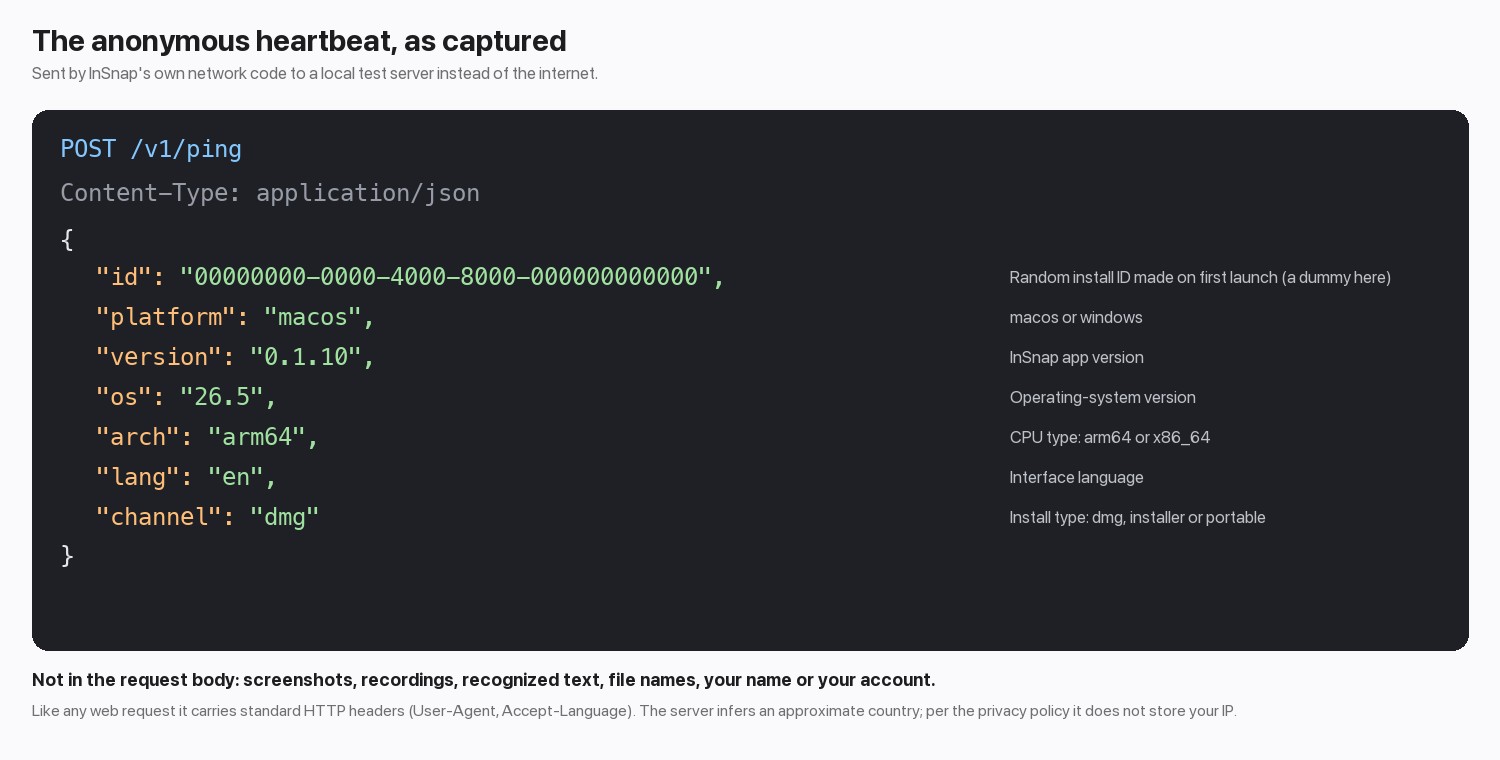
Each field is a short label: a random install ID, the platform, the app version, your operating-system version, CPU type, interface language and how InSnap was installed. Nothing in it identifies you, and nothing in it is a screenshot, a file name or text from your screen. The server works out an approximate country from the connection; the privacy policy says your IP address is not stored with the record.
The request also carries the standard HTTP headers any program sends, such as User-Agent and Accept-Language. In our capture Accept-Language followed the system locale, as it does for a web browser.
Every request the app can make
| When | What is sent | Do you trigger it? |
|---|---|---|
| First launch, then about weekly | The heartbeat shown above | No. It is automatic |
| Update check | A request for the update feed, a small file that lists the newest version | No. It is automatic; a Windows portable build only checks and points you to the website |
| The Pro upgrade prompt appears | An anonymous count: which feature, its state and the platform. No device ID | No, but it is sent only when the prompt shows |
| You start the free Pro trial | The device details used for activation (below) and the feature that triggered it | Yes |
| You activate Pro, then about every 3 days while it is active | Your activation code (at activation only), a hashed device ID, your computer's name, the platform and the app version | Yes, once you activate |
| You sign in or use Cloud | Your email or Google sign-in, session tokens, and any file you choose to share | Yes |
| You send feedback | What you typed plus the attachments and diagnostics the form shows you first | Yes |
Activation sends your computer's name so you can recognize that device in your device list on the website. It is the name your computer calls itself, which is often a person's name, so it is worth knowing.
What never leaves your computer
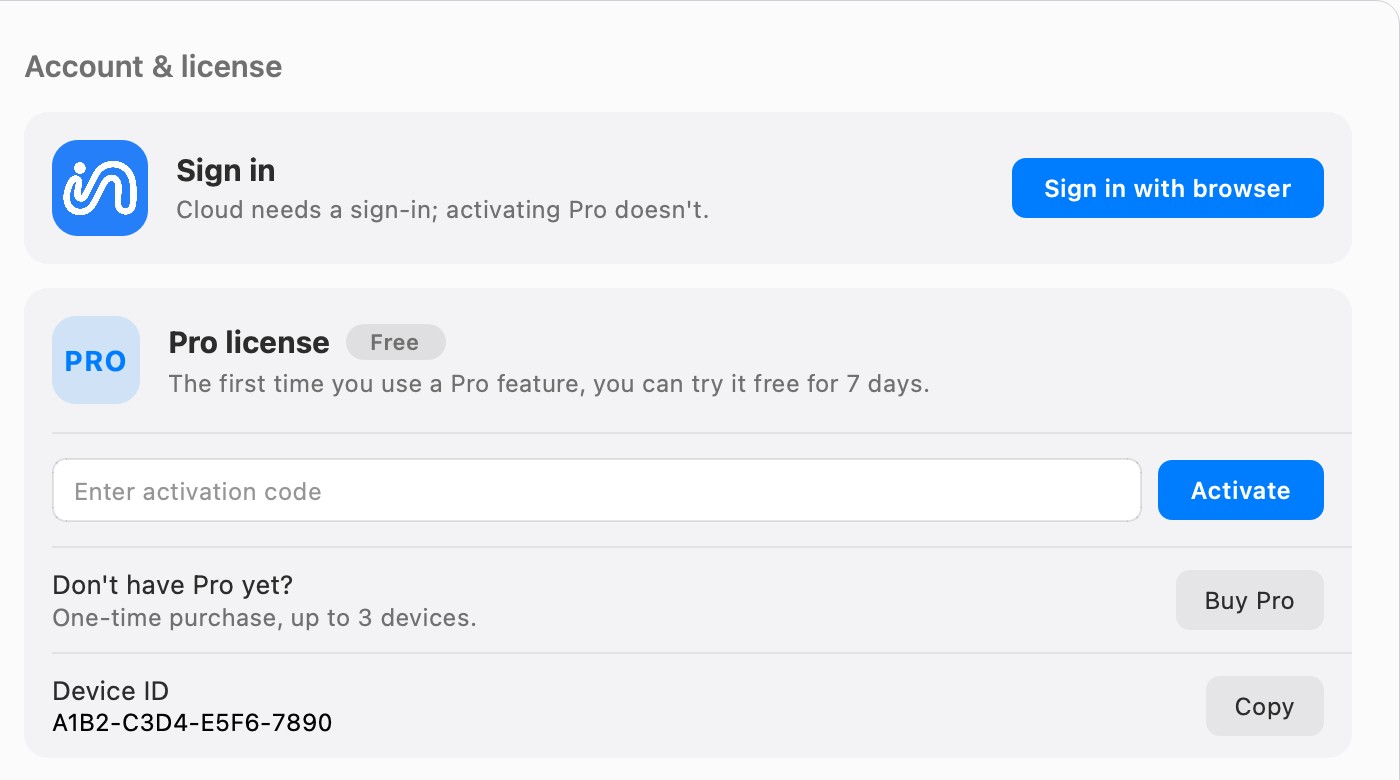
Capture, annotation, OCR, Smart Erase, recording, the screenshot history and the editors all run locally. There is no analytics or advertising SDK in the app, and no upload unless you press share with Cloud. Activating Pro needs no sign-in:
What this check does not cover
- The heartbeat capture used InSnap's own client code, not a packet trace of the shipped app. It shows the real request format. It cannot show when the app chooses to send it; that comes from the source and the privacy policy.
- We did not capture update traffic. The update tools, Sparkle on Mac and WinSparkle on Windows, make their own feed request.
- The website is separate. The public pages of insnap.app use Microsoft Clarity and Google Analytics. This article is about the app.
You can check it yourself with a firewall or network monitor you trust: watch InSnap's outgoing connections while you capture, annotate and record.
FAQ
Does InSnap upload my screenshots?
No, not by itself. Screenshots go off your computer only when you choose to share one with InSnap Cloud.
Can I turn the heartbeat off?
This version of InSnap has no setting for it. A blocked request fails silently and the app carries on; it tries again at its next check.
Does OCR send my text anywhere?
No. Text recognition runs on your computer with a bundled model, and it works offline.
Does InSnap need an account?
No. The free features need no account, and activating Pro needs only the activation code. An account is required for Cloud.
More from the blog

How to Send Feedback From InSnap (and What Gets Attached)
The in-app feedback form, the support page and what environment information is included. How to send a useful report without leaking screenshots or logs you did not choose.
October 25, 2026
How to Blur or Hide Sensitive Info in a Screenshot Safely
Blur, pixelate or cover? How to hide emails, names, keys and numbers in a screenshot so they cannot be recovered, and how to do it quickly with InSnap.
October 23, 2026
Share a Screenshot as a Link Instead of an Attachment
When a screenshot is too big for chat or needs to reach several reviewers, a share link works better. What to check, and how expiry and passwords work.
October 24, 2026
Where Are Screenshots Saved on Mac and Windows?
On a Mac, screenshots land on the Desktop by default; on Windows they go to Pictures › Screenshots. How to find them, change the folder, and stay organized.
October 24, 2026