 InSnap
Screenshot OCR in 11 Languages: Which Work, Which Don't

We tested offline OCR on 11 interface languages. English, Chinese and Latin-script languages read almost perfectly; Japanese, Korean and Russian failed. The numbers.
InSnap's offline OCR read eight of the eleven interface languages we tested almost perfectly, and failed on three: Japanese, Korean and Russian. Apple's text-recognition API, tested the same way, read all eleven at 98% or better.
So the answer to "does screenshot OCR work for my language" is not a yes or no. It depends on the script, and the gap is large enough that it is worth checking before you rely on a copy.
How we tested
For each language we took six real sentences from InSnap's own interface, in that language's translation, and rendered them in the system UI font at normal size. That gives a clean test sheet with exactly known text. We made each sheet at Retina (2x) and at 1x.
Two engines read every sheet:
- InSnap's OCR, which runs fully on your computer with a bundled model and is identical on Mac and Windows.
- Apple's Vision text recognition, the recognition API built into macOS, in accurate mode with automatic language detection. We tested the API directly, not a particular app that uses it.
The score is the average similarity between what the engine read and the real sentence, after ignoring spaces and case. 100% means every sentence came back exactly.
The results
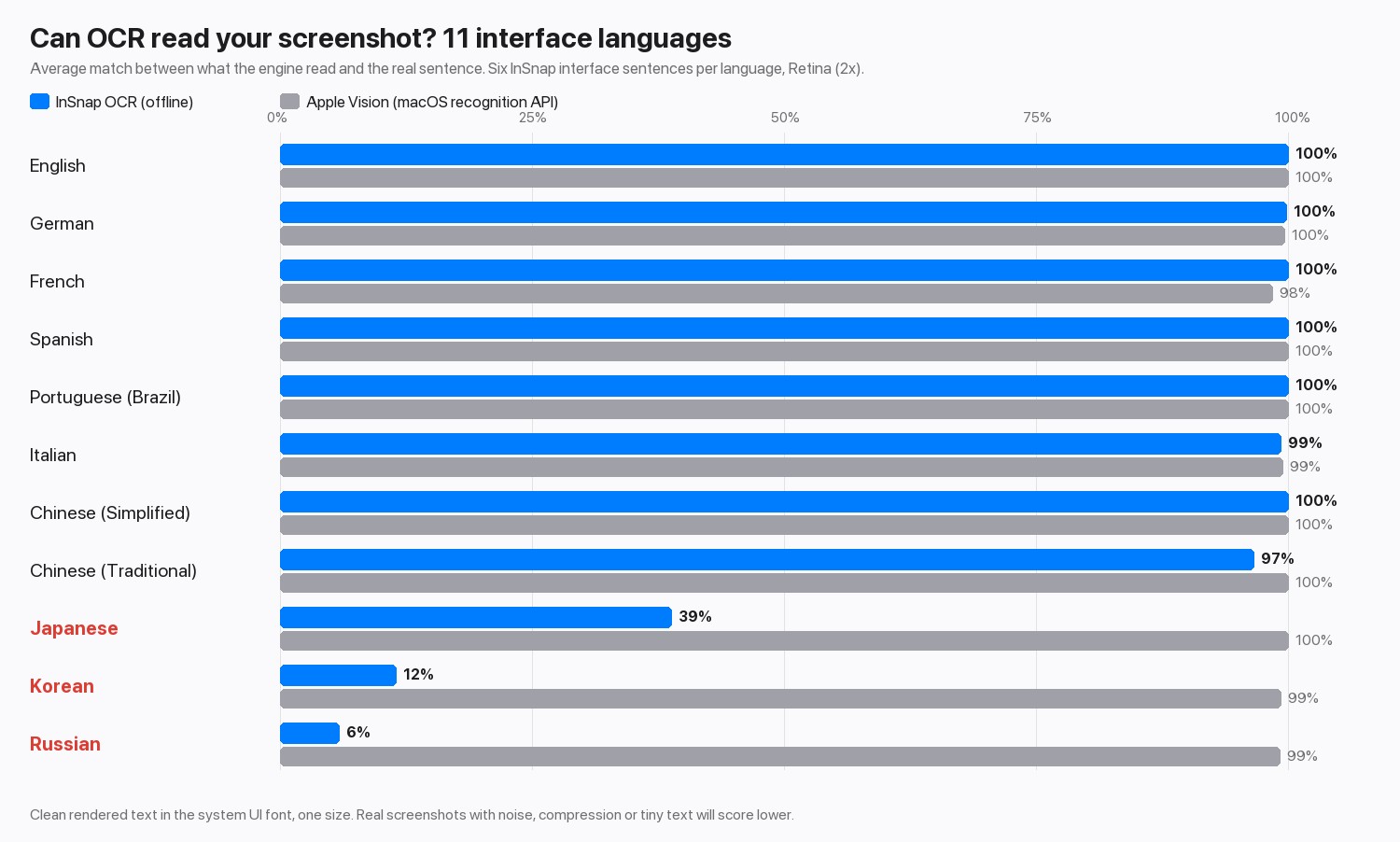
| Language | InSnap OCR | Apple Vision |
|---|---|---|
| English, German, Spanish, Portuguese | 100% | 100% |
| French | 100% | 98% |
| Italian | 99% | 99% |
| Chinese (Simplified) | 100% | 100% |
| Chinese (Traditional) | 97% | 100% |
| Japanese | 39% | 100% |
| Korean | 12% | 99% |
| Russian | 6% | 99% |
Retina and 1x sheets scored within a point of each other, so resolution was not the issue.
What a failure looks like
The three weak languages are not read badly. They are read as something else. Here is one of the test sentences, which a reader sees as perfectly clear text:
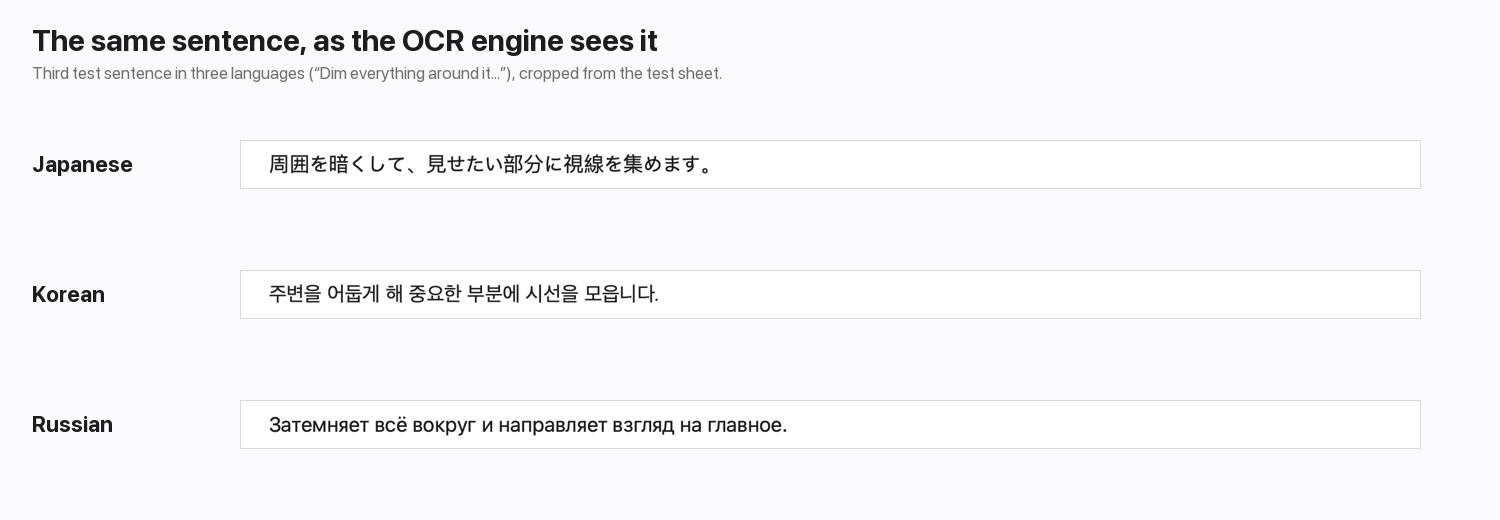
| Language | Real text | InSnap OCR returned |
|---|---|---|
| Japanese | 周囲を暗くして、見せたい部分に視線を集めます。 | 周田左暗<、見世左八部分仁視線左集末寸。 |
| Korean | 주변을 어둡게 해 중요한 부분에 시선을 모읍니다. | 牲号号列刮吞2勃早是人刈号卫号L… |
| Russian | Затемняет всё вокруг и направляет взгляд на главное. | 3aTeMHgeT Bcë BOKpyr V HanpaBIgeT B3rnA Ha rnaBHoe. |
Japanese keeps its kanji but swaps many kana for look-alike kanji. Korean comes back as a mix of Chinese characters, digits and punctuation. Russian is read as Latin letters and digits that resemble Cyrillic ones. In all three cases the output looks like text, so nothing warns you. (The Korean output is shortened here.) Traditional Chinese is mostly fine, but a few characters came back in their Simplified forms, so proofread names and quotes.
What this means for you
- English, Chinese and Latin-script languages: InSnap is accurate on clean text. Check numbers and proper names anyway; see how to get better OCR results.
- Japanese, Korean and Russian: do not copy from InSnap's OCR without checking every line. In our test Apple's recognition API handled all three, so on a Mac a tool that uses it is the better choice for those scripts. We did not test Windows' built-in recognition.
- Mixed text: select one script at a time where you can.
InSnap uses one bundled model on both Mac and Windows, so the result is the same on either, and nothing is uploaded. The trade-off is that its language coverage is fixed by that model.
What the test does not show
- Clean text only. Real screenshots carry compression, small sizes and busy backgrounds, and every engine scores lower there.
- Six sentences per language. Enough to show gaps of 60 to 90 points, not enough to rank two engines that both score above 97%.
- One font and size. Stylized fonts and handwriting are harder for any engine.
FAQ
Which languages can InSnap's OCR read?
In our test it read English, German, French, Spanish, Portuguese, Italian and Chinese (Simplified and Traditional) at 97% or better. Japanese, Korean and Russian were not readable.
Why does Russian text come out as Latin letters?
The recognition model was not built to read Cyrillic, so it picks the closest shapes it knows. Many Cyrillic letters look like Latin letters or digits, which is why the output looks like garbled English.
Does a larger screenshot or higher resolution help?
Not here. Retina and 1x test sheets scored within a point of each other. The limit is the model's language coverage, not the image quality.
Is the operating system's built-in OCR more accurate?
For Japanese, Korean and Russian, yes: Apple's Vision API read all three at 99% or better in our test. For English, Chinese and the Latin-script languages the two were equal within a few points.
More from the blog

Why OCR Returns the Wrong Word Instead of an Error
Text recognition rarely says it failed. It hands back a full sentence with one character wrong — the one that matters. Here is where that happens and how to catch it.
October 29, 2026
How to Copy Text From a Screenshot or Image on Mac and Windows
Turn the words in a screenshot into text you can copy. Built-in options on Mac and Windows, plus a fast on-device OCR workflow with InSnap.
October 23, 2026
How to Get Better OCR Results From a Screenshot
Text recognition is only as good as the pixels you give it. Crop tightly, keep the resolution, avoid skew and busy backgrounds, and know the language limits.
October 25, 2026
Screenshot Too Large to Upload? Why It Happens and How to Shrink It
A full-screen Retina PNG can run to several megabytes. Here is where the size comes from, and the scale, format and crop settings that bring it down without blurring text.
October 30, 2026